
Setup guide / ChatGPT
 Setup guide / ChatGPT
Offscreen setup
in ChatGPT.
Open now in ChatGPT and Claude. Sign in with your email and make your first sign.
Watch the demo01 + 02Your account and setup.
Use your own ChatGPT account. Add Offscreen with the connector address https://getoffscreen.com/mcp, sign in with your email or Google, and try the starter prompt. Need help? Email hello@getoffscreen.com.
In ChatGPT, adding a custom connector requires Developer mode until Offscreen is listed in the app directory.
03Start a connected chat.
In your account, start a new conversation and select the Offscreen connection. The connector appears as Offscreen.
04Try the starter prompt.
Start with your business details.

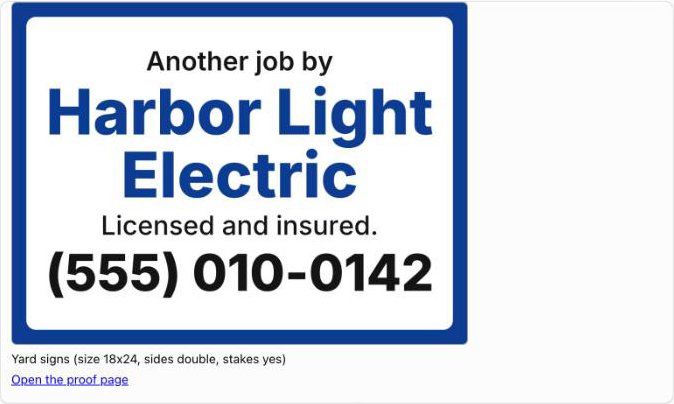
Show me the Offscreen catalog. Then make an 18 by 24 inch yard sign for my business and show me the proof and the price for 10. Do not start an order. Design with the Offscreen tools: get_design_guide, check_design, create_proof. Do not generate a picture of the sign; the proof is the design.
What you should see: a prompt to sign in to Offscreen, followed by the catalog. Add your business details to see a yard sign proof and a price estimate in the chat. This starter prompt does not place an order. When you are ready, approve your design and follow the checkout link to review the total, including shipping and tax, before you pay.
After an Offscreen update.
Both ChatGPT and Claude keep a copy of Offscreen's tool list from the day you connected. When we tell you the tools changed, refresh that copy or your assistant will say a feature does not exist.
In ChatGPT: Settings, Plugins, Offscreen, then "Refresh tools" under Manage app.
Something not connecting?
I cannot find an Offscreen listing.
Directory approval is pending. Add Offscreen with the connector address https://getoffscreen.com/mcp.
ChatGPT replies without using Offscreen.
Check that the connection is selected in your account. Use the starter prompt above. If setup is incomplete, email hello@getoffscreen.com.
The connection gives an error.
Confirm that you used the connector address https://getoffscreen.com/mcp and your own account. Email hello@getoffscreen.com with the error message. Do not send passwords or keys.
How do I order my signs?
Customers can design and order all eleven products in ChatGPT or Claude: yard signs, truck magnets, door hangers, flyers, business cards, QR review cards, vinyl banners, postcards, rack cards, die cut vinyl labels, and adhesive vinyl decals. Review your proof and price estimate in the chat, then approve the design and pay on an Offscreen checkout page. Shipping and tax are shown before you pay. We print and ship your approved order. Each product carries a scan code to your business page. Ask Offscreen for the catalog to see sizes and options.
Need a hand? Email hello@getoffscreen.com.